
The most popular and comprehensive Open Source ECM platform
Let us know more


HashiCorp, the business behind open source products like Vagrant, Consul and Terraform, announced today the launch of their first commercial product, Atlas. Atlas unifies all the steps of the application development workflow, starting with development, to the deployment and maintenance of the application. The goal of Atlas is to create a common tool that can be used by developer and operations groups alike. To help bring the product to market, HashiCorp recently received new series A venture funding from Mayfield, GGV Capital and True Ventures.
What is Atlas?
Atlas is a commercial, closed-source wrapper around HashiCorp’s five popular open source projects:
But really, Atlas is more that just a wrapper. Mitchell Hashimoto, HashiCorp founder, explained that “Atlas provides a single foundation for developing, deploying and maintaining applications on any infrastructure. The way it does that is by encapsulating all pieces into one management layer: all your servers, all your VMs, all your containers, all your configuration management components, and so on. Out of this, it exposes one workflow… and that workflow targets each user role and where you are in the workflow… So whether you are a developer, an operator, or whether you have a role in compliance, we’ve built it around that. And finally, since this is all in one system, we’re able to expose all this information in a dashboard… So developers can see what applications they’re able to work on, what version of code things are at, and what things they’ve deployed recently. They can see the work that’s interesting to them. Operators on the other hand, can see what deploys are going out and what infrastructure has changed.”
HashiCorp’s design of Atlas is one of simplicity. Atlas provides:
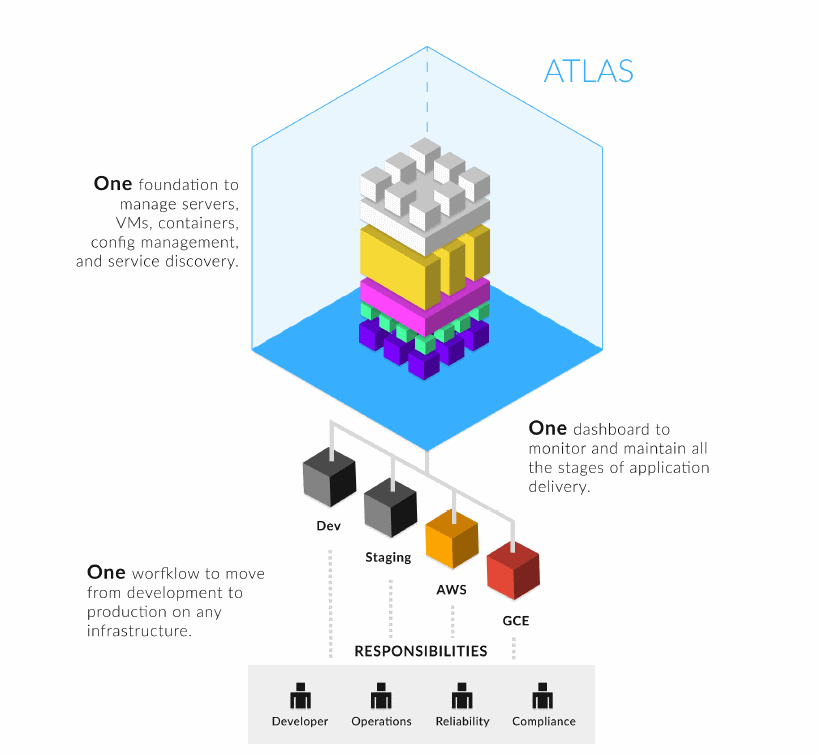
Atlas is one foundation for developing, deploying, and maintaining applications on any infrastructure.
Application Lifecycle with Atlas
Hashimoto explained that orchestrating the lifecycle of an application from development to production and maintenance has a lot of different intermediate steps, steps that involve both technical and organizational issues. He commented that coordinating this process is really a common problem but that it is happening in almost every organization, and each time when an organization confronts the problem, it tries to re-invent their own solution for it. At issue here is that usually solving this problem isn’t in the core competency of the company. Nevertheless, since a solution is necessary, the company is forced into spending the time and resources to build it. But if you build something that’s not in your core competency and which you just want to work so you can move onto other things, you usually run into problems. Homebrew solutions are typically based on technology that the people tasked with building the solution are currently using or familiar with, regardless of whether or not the tools they choose are the best ones for the job. Unfortunately this approach causes companies to be locked into their custom homebrew solution.
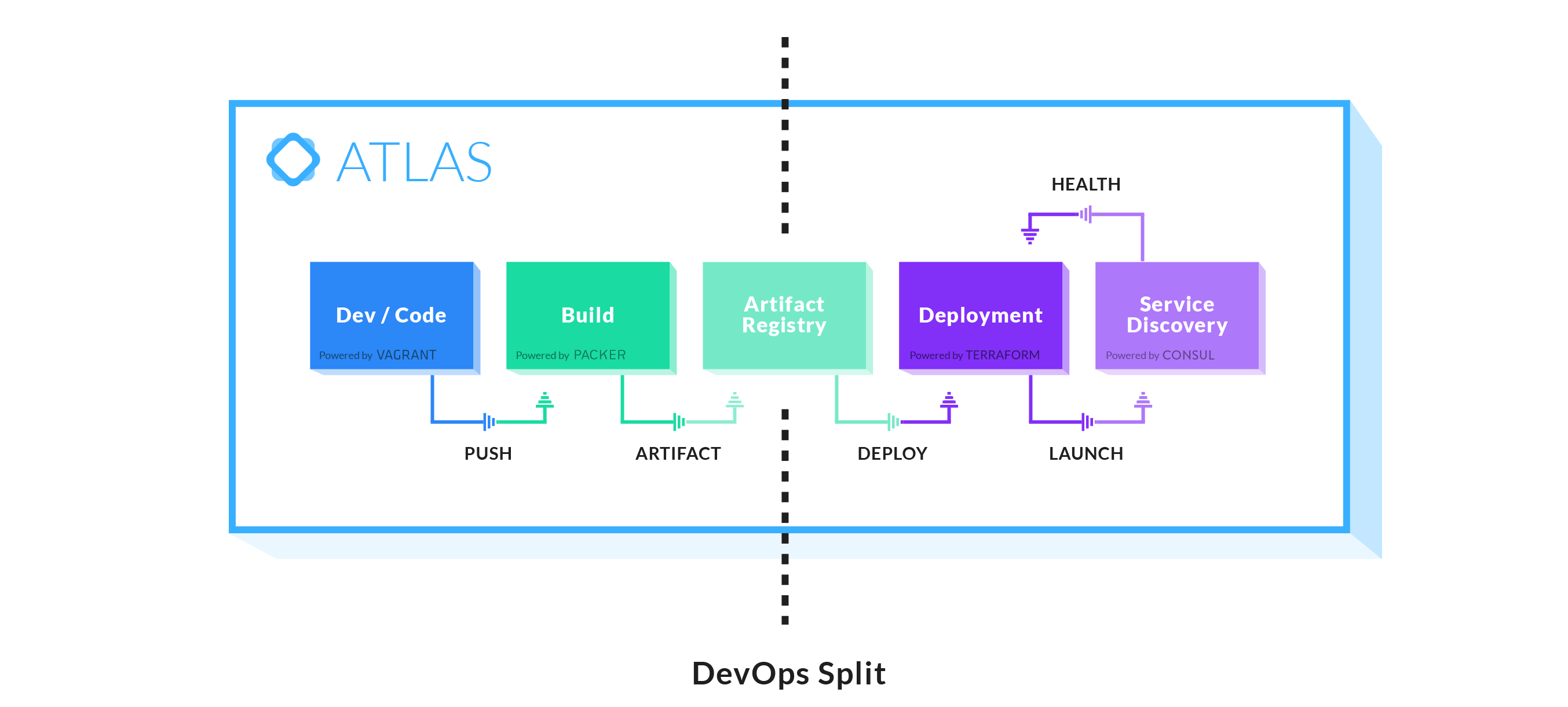
Atlas is a framework that’s designed specifically to solve this problem. Snapped into this framework are the tools that do the bulk of the work. These tools include, out of the box, HashiCorp’s open source products, but the design of the Atlas framework is such that other tools could be snapped to replace the HashiCorp products.
Application Delivery Steps
Atlas breaks the application delivery process into five steps. Developers first work on code, and when ready to deploy, make use of Vagrant to deploy their apps via ‘vagrant push’. This then sends their code to the Build tool which is run by Packer. Packer is able to create images and artifacts for many different technologies. It’s able to create the machine images, the Docker containers, basic jars, any sort of general artifact. All of these are stored into an artifact registry. The registry is able to keep track of all the different artifacts that you have, what type they are, and what different environments they’re from, like development, staging, QA, or production. The registry both stores and versions them.
After that, the line is crossed into the deployment side. This is powered out of the box by Atlas with Terraform. Terraform can query the registry to find things like the latest production image of AWS for this application that runs on 64-bit machines. Terraform can be set up to do things like rolling deploys, canary deploys or session draining. It handles all the complex orchestration that’s needed to get the application deployed.
Once the application is deployed, Atlas picks it up once again in Consul. Consul then determines if the app is running and if it is the app healthy. It knows where the app is running, it’s address, how to access it, and what it’s configuration is. While Consul on it’s own is able to monitor data, it can’t actually fix problems. Terraform, on the other hand, knows how to do server life cycles, so when you integrate these together, Consul is able to tell Terraform the data that’s monitored, and Terraform is able to act on it.
Hashimoto commented that “a really important point is that each one of these boxes could be either skipped or replaced with another system that you already have, so you don’t need to go ‘all in’ with Atlas to really get value out of it. For example, a very common step that people aren’t as keen to replace is the build step. They actually might have something like Continuous Integration (CI) or something already in place. So in that case, you can configure ‘vagrant push’ to go to their CI and then the CI could send the artifact directly to the artifact registry. You get to keep all that. [In the diagram above] all these spaces between the boxes and the arrows between the boxes are public API endpoints. We actually consume our own API so you could actually integrate any one of those points with other systems.”
Who will use Atlas?
Companies whose core competency is not in the devops area will find value in Atlas, particularly if their company can see the promise of tools like virtualization, containerization, the public cloud, and service providers. Atlas can provide these companies a map to for modernizing their legacy processes and systems. These businesses can integrate into the Atlas workflow one application at a time, gradually transitioning to the new framework provided by Atlas using the newer technologies. As these companies transition, they can retain the same workflow and reduce friction in the transition. Atlas can also provide a transition pathway for companies to move to the cloud, either public or private, and it gives them a future path for things that don’t exist yet, a way to prepare for the next paradigm.
Atlas could provide value to system integration projects. For example, if there is a big company that is participating in any sort of M&A events there’s usually a lot of separate systems. This is a problem where Atlas could help.
Atlas could also be useful in the area of configuration management. Companies that are currently running multiple configuration management tools could greatly simplify their processes by using Atlas to unify these systems, allowing them to show all their metadata in one place, or it could even remove some of these systems all together.


